Difference between revisions of "Features"
3qdesigns123 (talk | contribs) (→GENERATORS) |
m (fix template redirect {{Version manual}} > {{man version}}) |
||
| (257 intermediate revisions by 14 users not shown) | |||
| Line 1: | Line 1: | ||
| − | + | <!--Redirected from: https://gramps-project.org/features/ which goes to https://gramps-project.org/blog/features/ --> | |
| − | |||
{{languages|Features}} | {{languages|Features}} | ||
| − | + | {{man note|You may find the Gramps downloads|On the following page {{man tooltip|[[Download]]}}}} | |
| − | * | + | [[File:MainWindow-example-60.png|right|thumb|450px|Example of a Gramps Main Windows]] |
| − | * | + | [[File:Gramp-Small-background-wiki-2020.jpg|120px]] |
| − | {| | + | '''Research, organize and share your family tree with Gramps.''' |
| + | |||
| + | Gramps is a free software project and community. We strive to produce a genealogy program that is both intuitive for hobbyists and feature-complete for professional genealogists. It is a community project, created, developed and governed by genealogists. | ||
| + | |||
| + | ;'''Focus on Your Research''' | ||
| + | |||
| + | Every person has their own story but they are also part of a collective family history. Gramps gives you the ability to record the many details of an individual’s life as well as the complex relationships between various people, places and events. All of your research is kept organized, searchable and as precise as you need it to be. | ||
| + | |||
| + | =Community= | ||
| + | The Gramps program has been available for decades since being released in April 2001 and has continually grown with many features and capabilities. | ||
| + | |||
| + | * Active community involvement. Many current Gramps users contribute reports, suggestions, and feedback to the developers through the supported [[Contact#Forum|forums]] or [[Contact#Mailing_lists|public mailing lists]]. | ||
| + | * Active development effort. New features are being designed and coordinated by several active developers. Many additional participants assist through the mailing lists. Group effort shapes and tests Gramps constantly improving functionality and usability. | ||
| + | * Portable. Gramps is written in a computer language called [https://wikipedia.org/wiki/Python_(programming_language) <abbr title="honoring Monty Python's Flying Circus">Python</abbr>] using [https://wikipedia.org/wiki/GTK <abbr title="formerly GIMP ToolKit">GTK</abbr>] and [https://wikipedia.org/wiki/GNOME <abbr title="formerly GNU Network Object Model Environment">GNOME</abbr>] libraries. While only well supported in certain Unix and Linux environments, these are multi-platform development libraries, meaning that Gramps can be ported to any platform the required libraries are ported to. | ||
| + | * Free Software/Open Source development model means Gramps can be extended by any programmer since all of the source code is freely available under its license. | ||
| + | * Gramps is freely distributed under the [https://wikipedia.org/wiki/GNU_General_Public_License <abbr title="General Public License">GPL</abbr>]. | ||
| + | |||
| + | =Overview= | ||
| + | Below is a summary of how Gramps helps you organize and analyze your family history. | ||
| + | * Many different [[Gramps_{{man version}}_Wiki_Manual_-_Categories|Category views]] for navigating your family tree: | ||
| + | {| {{Prettytable}} | ||
|- valign="top" | |- valign="top" | ||
| − | | | + | |{{icon|gram}}'''Dashboard''' |
| − | + | A dashboard to help you monitor the progress of your research. A variety of widgets (Gramplets) provide quick analysis of your data and more. | |
| + | [[File:DashboardCategory-DashboardView-default-gramplets-60.png|center|600px]] Displays different general purpose [[Gramplets]], small widgets that can help in your genealogical research. | ||
|- valign="top" | |- valign="top" | ||
| − | | | + | |{{icon|peop}}'''People''' |
| − | + | A list of every individual in your records featuring birth/death dates and more | |
| + | [[File:PeopleTreeView-GroupedPeople-example-with-context-menu-60.png|center|600px]] Displays the people in the family tree without their connections. This Category contains the PeopleListView and the Grouped PeopleTreeView. Filter the display using preset filters or a custom filter. | ||
|- valign="top" | |- valign="top" | ||
| − | | | + | |{{icon|rela}} '''Relationship''' |
| − | | | + | A summary of the active person’s parents, siblings, spouses and children. |
| − | |- valign="top" | + | [[File:Relationships-category-view-default-60.png|center|600px]] Display a family of parents, grandparents and children with the birth/death dates and relationships. Navigate to nearby relatives with a single click. |
| − | | | + | |- valign="top" |
| − | | | + | |{{icon|fami}} '''Families''' |
| − | |- valign="top" | + | A list of every family group featuring parent names, relationship status and, if applicable, marriage dates. |
| − | | | + | [[File:Families-category-list-view-60.png|center|600px]] List all families in a single view. Double-click on each to edit, add notes, and to see parents and children in each family. |
| − | | | + | |- valign="top" |
| + | |{{icon|ance}}'''Charts - Pedigree'''[[File:ChartsCategory-Pedigree-view1-horizontal-right-standard-5gen-default-60.png|center|600px]] Display the family in the traditional pedigree view. Hold the mouse over individuals to see more information about them and to move to more distant parts of the tree | ||
| + | |||
| + | A graphic representation of the active person’s ancestry featuring photos and birth/death dates. | ||
| + | |- valign="top" | ||
| + | |{{icon|ance}}'''Charts - Fan Chart'''[[File:ChartsCategory-fanchartview-fullcircle-9gen-default-52.png|center|600px]] Displays graphical trees for the selected person. | ||
| + | |||
| + | A graphic representation of the active person’s ancestry featuring photos and birth/death dates. | ||
| + | |- valign="top" | ||
| + | |{{icon|ance}}'''Charts - Descendant Fan Chart'''[[File:ChartsCategory-DescendantFanChart-fullcircle-9gen-default-60.png|center|600px]] Displays graphical trees for the selected person. | ||
| + | |||
| + | A graphic representation of the active person’s ancestry featuring photos and birth/death dates. | ||
| + | |- valign="top" | ||
| + | |{{icon|ance}}'''Charts - 2-Way Fan Chart'''[[File:ChartsCategory-2-WayFan-fullcircle-ances4gen-descen4gen-example-defaults-60.png|center|600px]] Displays graphical trees for the selected person. 4 Generations of Ancestors (Top) / 4 Generations of Descendants (bottom) | ||
| + | |||
| + | A graphic representation of the active person’s ancestry featuring photos and birth/death dates. | ||
| + | |- valign="top" | ||
| + | |{{icon|even}} '''Event''' | ||
| + | A list of every event in your records featuring descriptions, event types, dates and places. | ||
| + | [[File:EventsCategory-EventsListView-example-60.png|center|600px]] Displays the events in the family tree in a single view. Double-click on each to edit, add source, and to see which individuals reference the event. | ||
| + | |- valign="top" | ||
| + | |{{icon|plac}} '''Place''' | ||
| + | A list of every place in your records featuring place names and location details. | ||
| + | [[File:PlacesCategory-PlaceView-list-example-60.png|center|600px]] Displays the places in the family tree and sort the list by half a dozen headings such as City, County or State. | ||
| + | |- valign="top" | ||
| + | |{{icon|geog}} '''Geography''' | ||
| + | An interactive map view highlighting places associated with one person, a group of people or all people in your records. | ||
| + | [[File:GeographyCategory-GeoPlaces-view-AllKnownPlaces-openstreemap-example-60.png|center|600px]] Displays data of your family tree on a map. | ||
| + | |- valign="top" | ||
| + | |{{icon|sour34}} '''Source''' | ||
| + | A list of all sources referenced in your records featuring authors and publication details. | ||
| + | [[File:SourcesCategory-CitationTree-View-example-60.png|center|600px]] Displays the sources in the family tree in a single view. Double-click on each to edit, add notes, and to see which individuals reference the source. | ||
| + | |- valign="top" | ||
| + | |{{icon|cite}} '''Citations''' | ||
| + | A list of all citations referenced in your records featuring quality, date, volume and page. | ||
| + | [[File:CitationsCategory-CitationView-List-example-60.png|center|600px]] Displays the citations in the family tree. | ||
| + | |- valign="top" | ||
| + | |{{icon|repo}} '''Repository''' | ||
| + | A list of source repositories referenced in your records featuring web addresses, physical addresses and email contact information. | ||
| + | [[File:RepositoriesCategory-Repositories-ListView-example-60.png|center|600px]] List all source repositories in a single view. Double-click on each to edit, add notes, and to see which sources reference the repository. | ||
| + | |- valign="top" | ||
| + | |{{icon|medi}} '''Media''' | ||
| + | A list of all photos, videos and other media referenced in your records featuring thumbnail preview, media type and more. | ||
| + | [[File:MediaCategory-Media-ListView-example-60.png|center|600px]] List all forms of media referenced in the family tree. Can be graphic images, videos, sound clips, spreadsheets, documents, etc. | ||
| + | |- valign="top" | ||
| + | |{{icon|note}} '''Notes''' | ||
| + | A list of all text notes included in your records featuring note type and preview. | ||
| + | [[File:NotesCategory-Notes-ListView-example-60.png|center|600px]] Displays the notes in the family tree. | ||
| + | |- valign="top" | ||
| + | | | ||
|} | |} | ||
| + | |||
| + | ==Features== | ||
* Bookmark favorite individuals for quick access. (The number able to be marked is unlimited) | * Bookmark favorite individuals for quick access. (The number able to be marked is unlimited) | ||
* Custom filters. In addition to the numerous preset filters, create any number of selections based on interesting facts about your family to use for reports and data exports. | * Custom filters. In addition to the numerous preset filters, create any number of selections based on interesting facts about your family to use for reports and data exports. | ||
| − | * Link any media or filetype to your | + | * Link any media or filetype to your Gramps family tree. Choose between copying or linking the file to the database. |
* Privacy options allow restriction of any information marked with this option or information about living individuals. Data marked with this option can be excluded in reports and data exports. | * Privacy options allow restriction of any information marked with this option or information about living individuals. Data marked with this option can be excluded in reports and data exports. | ||
| − | * Multiple calendars and date ranges are supported. You can convert between Gregorian, Julian, Hebrew, French republican, | + | * Multiple calendars and date ranges are supported. You can convert between Gregorian, Julian, Hebrew, French republican, Persian and Islamic calendars from within Gramps via the Date selection window, and you can use fuzzy dates like about 1874, estimated 1905, ... |
| + | * View, edit, and save Image Exif Metadata for use with modern-day cameras, cell phones, and graphic programs... | ||
| + | |||
| + | ==Reports== | ||
| − | + | [[File:RelationshipChartDescendants-example-41.png|right|thumb|600px|An example descendant chart]] | |
| − | |||
| − | |||
| − | |||
| − | |||
| − | |||
| − | |||
Generate brief or detailed reports for the ancestors or descendants of an individual. | Generate brief or detailed reports for the ancestors or descendants of an individual. | ||
| − | * Multiple styles of reports are currently available by default. Users can also create their own custom styles. | + | * Multiple styles of reports are currently available by default. Users can also create their own [[Gramps_{{man version}}_Wiki_Manual_-_Settings#Customize_report_output_formats|custom styles]]. |
| − | * Eight output formats are supported by | + | * Eight output formats are supported by Gramps: PDF, OpenDocument, HTML, Rich Text Format (RTF), Latex, and plain text. |
* Custom reports can be created by advanced users under the "plugin" system which allows the sharing of custom report styles between users. | * Custom reports can be created by advanced users under the "plugin" system which allows the sharing of custom report styles between users. | ||
* Book report allows the user to collect a variety of reports in a single document, which in turn is easier to distribute. | * Book report allows the user to collect a variety of reports in a single document, which in turn is easier to distribute. | ||
| − | Charts and Graphs - Create graphical Ancestor and | + | Charts and Graphs - Create graphical Ancestor and Descendant charts in several formats. |
| − | |||
| − | * Box and Fan charts are available, see | + | * Box and Fan charts are available. ''For example, see the [[Howto: Make a relationship chart|Make a relationship chart]] "How to..." article. |
| − | * Multiple formats are supported by | + | * ''Multiple formats are supported by Gramps for charts and graphs: OpenDocument Draw, PDF, PostScript, and SVG. |
* Custom charts can be created by users. We hope to add more in the near future through the contributions of users and developers. | * Custom charts can be created by users. We hope to add more in the near future through the contributions of users and developers. | ||
| − | Export to Web Pages -Select the entire database, family lines or selected individuals to a collection of web pages ready for upload to the World Wide Web. | + | Export to Web Pages - Select the entire database, family lines or selected individuals to a collection of web pages ready for upload to the World Wide Web. |
| + | |||
| + | <!-- Sample reports have not been generated. | ||
| + | *[[Sample reports]] | ||
| + | --> | ||
| + | <!-- | ||
| + | * Quick View reports | ||
| + | --> | ||
| + | *[[Gramps_{{man version}}_Wiki_Manual_-_Reports|Reports]] chapter of the User Manual | ||
| + | {{-}} | ||
==Tools== | ==Tools== | ||
A rich set of tools includes operations such as checking database for errors and consistency, as well as the research and analysis tools such as event comparison, duplicate people finding, interactive descendant browser, and others. | A rich set of tools includes operations such as checking database for errors and consistency, as well as the research and analysis tools such as event comparison, duplicate people finding, interactive descendant browser, and others. | ||
| − | * Merge | + | * Merge - Combine two separate people into one. Very useful combining two databases with overlapping people. |
| − | * Soundex | + | * Soundex generator - Generate the standard codes commonly used in genealogy to compare similar sounding names even though spelled differently. |
| + | |||
| + | |||
| + | * [[Gramps_{{man_version}}_Wiki_Manual_-_Tools|Tools]] chapter of the User Manual | ||
==File formats== | ==File formats== | ||
| − | Import/Export support for | + | Import/Export support for several different formats. |
| + | |||
| + | * GEDCOM import and export. Extensive support for the de-facto industry standard GEDCOM version 5.5.1 so you can exchange Gramps information to and from users of most other genealogy programs. | ||
| + | * Gramps package import and export. A compressed file containing your family tree data and any other files used. Useful for backup or sharing with other Gramps users. | ||
| + | * Web Family Tree export. Web Family Tree (WFT) allows you to display your family tree online with only a single file, instead of many HTML files the web page report generates. | ||
| + | |||
| + | |||
| + | * [[Gramps_{{man_version}}_Wiki_Manual_-_Manage_Family_Trees#Importing_data|Importing data]] | ||
| + | * [[Gramps_{{man_version}}_Wiki_Manual_-_Manage_Family_Trees#Exporting_data|Exporting data]] | ||
| + | |||
| + | ==Languages== | ||
| + | ;'''Work in Your Native Language''':Thanks to our great international community, many contributors have helped translating Gramps into numerous languages. | ||
| + | |||
| + | * Multiple languages and cultures support is mature. | ||
| + | ** Translations exist for 43 languages + 1 Custom Language (See the [[Portal:Translators|Translators Portal]])<!-- check and update this number --> | ||
| + | ** Gramps has been designed so that new translations can easily be added with little development effort. If you are interested in participating please see the [[Portal:Translators|Translators Portal]] | ||
| + | ** Relationship calculators available in twenty languages (See [[Handler List]]) | ||
| + | ** Full Unicode support. Characters for all languages are properly displayed. | ||
| + | |||
| + | <center> | ||
| + | https://hosted.weblate.org/widgets/gramps-project/-/gramps/horizontal-auto.svg.png <br />[[file:Gramps-logo.png|link=https://hosted.weblate.org/engage/gramps-project/]] https://hosted.weblate.org/widgets/gramps-project/-/287x66-grey.png | ||
| + | </center> | ||
| − | + | ==Third-party Addons== | |
| − | + | Gramps comes with a core set of plugins which provide all of the critical features. | |
| − | |||
| − | |||
| − | + | However, you can extend this functionality with additional Third-party Addons. These addons provide reports, filters, views, [[Gramplets]], and more. | |
| − | * | + | * [[Third-party Addons]] |
| − | |||
| − | |||
| − | |||
| − | |||
== Checklist == | == Checklist == | ||
| − | {| {{Prettytable}} | + | {| {{Prettytable}} |
|- | |- | ||
| − | !bgcolor="#8DA7D6" style="line-height:2.25em;"| | + | !bgcolor="#8DA7D6" style="line-height:2.25em;"| Gramps |
| − | !bgcolor="#8DA7D6" style="line-height:2.25em;"| | + | !bgcolor="#8DA7D6" style="line-height:2.25em;"| 5.2.x |
| − | !bgcolor="#8DA7D6" style="line-height:2.25em;"| | + | !bgcolor="#8DA7D6" style="line-height:2.25em;"| 6.0.x |
| − | |||
|- | |- | ||
|bgcolor="lightgray"|Price | |bgcolor="lightgray"|Price | ||
| − | |style="color: | + | |style="color:green;"|Free |
| − | |style="color: | + | |style="color:green;"|Free |
| − | |||
|- | |- | ||
|bgcolor="lightgray"|Open Source | |bgcolor="lightgray"|Open Source | ||
| − | |Yes | + | |style="color:green;"|Yes |
| − | |Yes | + | |style="color:green;"|Yes |
| − | |Yes | + | |- |
| + | !style="color:blue;" colspan="9"|Category Views | ||
| + | |- | ||
| + | |bgcolor="lightgray"|Dashboard | ||
| + | |style="color:green;"|Yes | ||
| + | |style="color:green;"|Yes | ||
| + | |- | ||
| + | |- | ||
| + | |bgcolor="lightgray"|People | ||
| + | |style="color:green;"|Yes | ||
| + | |style="color:green;"|Yes | ||
| + | |- | ||
| + | |bgcolor="lightgray"|Families | ||
| + | |style="color:green;"|Yes | ||
| + | |style="color:green;"|Yes | ||
| + | |- | ||
| + | |bgcolor="lightgray"|Relationships | ||
| + | |style="color:green;"|Yes | ||
| + | |style="color:green;"|Yes | ||
|- | |- | ||
| − | + | |bgcolor="lightgray"|Charts | |
| + | |style="color:green;"|Yes (4 - Pedigree Chart / Ancestor Fan Chart / Descendant Fan / 2-Way Fan) | ||
| + | |style="color:green;"|Yes (4 - Pedigree Chart / Ancestor Fan Chart / Descendant Fan / 2-Way Fan) | ||
|- | |- | ||
| − | |bgcolor="lightgray"| | + | |bgcolor="lightgray"|Events |
| − | |Yes | + | |style="color:green;"|Yes |
| − | | | + | |style="color:green;"|Yes |
| − | |Yes | ||
|- | |- | ||
| − | |bgcolor="lightgray"| | + | |bgcolor="lightgray"|Places |
| − | |Yes | + | |style="color:green;"|Yes |
| − | | | + | |style="color:green;"|Yes |
| − | |Yes | ||
|- | |- | ||
| − | |bgcolor="lightgray"| | + | |bgcolor="lightgray"|Geography |
| − | |Yes | + | |style="color:green;"|Yes |
| − | | | + | |style="color:green;"|Yes |
| − | |Yes | ||
|- | |- | ||
| − | |bgcolor="lightgray"| | + | |bgcolor="lightgray"|Sources |
| − | |Yes | + | |style="color:green;"|Yes |
| − | | | + | |style="color:green;"|Yes |
| − | |Yes | ||
|- | |- | ||
| − | |bgcolor="lightgray"| | + | |bgcolor="lightgray"|Citations |
| − | |Yes | + | |style="color:green;"|Yes |
| − | | | + | |style="color:green;"|Yes |
| − | |Yes | ||
|- | |- | ||
| − | |bgcolor="lightgray"| | + | |bgcolor="lightgray"|Repositories |
| − | |Yes | + | |style="color:green;"|Yes |
| − | | | + | |style="color:green;"|Yes |
| − | |Yes | ||
|- | |- | ||
|bgcolor="lightgray"|Media | |bgcolor="lightgray"|Media | ||
| − | | | + | |style="color:green;"|Yes |
| − | |Yes | + | |style="color:green;"|Yes |
| − | | | ||
| − | |||
| − | |||
| − | |||
| − | |||
| − | |Yes | ||
|- | |- | ||
|bgcolor="lightgray"|Notes | |bgcolor="lightgray"|Notes | ||
| − | | | + | |style="color:green;"|Yes |
| − | |Yes | + | |style="color:green;"|Yes |
| − | |Yes | ||
|- | |- | ||
| − | !style="color:blue;" colspan=" | + | !style="color:blue;" colspan="9"| Chart Types |
|- | |- | ||
| − | !style="color:blue;" colspan=" | + | !style="color:blue;" colspan="9"| Reports |
|- | |- | ||
|bgcolor="lightgray"|Books | |bgcolor="lightgray"|Books | ||
| − | |Yes | + | |style="color:green;"|Yes |
| − | | | + | |style="color:green;"|Yes |
| − | |Yes | ||
|- | |- | ||
|bgcolor="lightgray"|Family Group Sheets | |bgcolor="lightgray"|Family Group Sheets | ||
| − | |Yes | + | |style="color:green;"|Yes |
| − | | | + | |style="color:green;"|Yes |
| − | |Yes | ||
|- | |- | ||
|bgcolor="lightgray"|Individual Summary | |bgcolor="lightgray"|Individual Summary | ||
| − | |Yes | + | |style="color:green;"|Yes |
| − | | | + | |style="color:green;"|Yes |
| − | |Yes | ||
|- | |- | ||
|bgcolor="lightgray"|Sosa Numbering (ascendants) | |bgcolor="lightgray"|Sosa Numbering (ascendants) | ||
| − | |Yes | + | |style="color:green;"|Yes |
| − | | | + | |style="color:green;"|Yes |
| − | |Yes | ||
|- | |- | ||
|bgcolor="lightgray"|Henry Numbering (descendants) | |bgcolor="lightgray"|Henry Numbering (descendants) | ||
| − | |Yes | + | |style="color:green;"|Yes |
| − | | | + | |style="color:green;"|Yes |
| − | |Yes | ||
|- | |- | ||
|bgcolor="lightgray"|Count numbering (descendants) | |bgcolor="lightgray"|Count numbering (descendants) | ||
| − | | | + | |style="color:green;"|Yes |
| − | |Yes | + | |style="color:green;"|Yes |
| − | |Yes | ||
|- | |- | ||
|bgcolor="lightgray"|Calendar | |bgcolor="lightgray"|Calendar | ||
| − | |Yes | + | |style="color:green;"|Yes |
| − | | | + | |style="color:green;"|Yes |
| − | |Yes | ||
|- | |- | ||
| − | !style="color:blue;" colspan=" | + | !style="color:blue;" colspan="9"| Database |
|- | |- | ||
|bgcolor="lightgray"|Native Database | |bgcolor="lightgray"|Native Database | ||
| − | |Yes (Berkeley DB) | + | |style="color:green;"|Yes ('''SQLite''' (default)/Berkeley DB (read-only)) |
| − | | | + | |style="color:green;"|Yes ('''SQLite''' (default)/Berkeley DB (read-only)) |
| − | |Yes | ||
|- | |- | ||
| − | |bgcolor="lightgray"| [[ | + | |bgcolor="lightgray"| [[Gramps Performance|Size Limit]] |
| − | |Yes (tested up to | + | |style="color:green;"|Yes (tested up to 1.4 Million people ([[Gramps_Performance#JohnBoyTheGreat_2019-12.2C_version_5.1.1|GRANDMA]])) |
| − | | | + | |style="color:green;"|Yes (tested up to 1.4 Million people ([[Gramps_Performance#JohnBoyTheGreat_2019-12.2C_version_5.1.1|GRANDMA]])) |
| − | | | ||
|- | |- | ||
|bgcolor="lightgray"| Open multiple Databases at once | |bgcolor="lightgray"| Open multiple Databases at once | ||
| − | |No (works for viewing, not supported !!) | + | |style="color:red;"|No (works for viewing, not supported !!) |
| − | | | + | |style="color:red;"|No (works for viewing, not supported !!) |
| − | | | ||
|- | |- | ||
| − | !style="color:blue;" colspan=" | + | !style="color:blue;" colspan="9"| Multimedia |
|- | |- | ||
|bgcolor="lightgray"|Audio | |bgcolor="lightgray"|Audio | ||
| − | |Yes | + | |style="color:green;"|Yes |
| − | | | + | |style="color:green;"|Yes |
| − | |Yes | ||
|- | |- | ||
|bgcolor="lightgray"|Video | |bgcolor="lightgray"|Video | ||
| − | |Yes | + | |style="color:green;"|Yes |
| − | | | + | |style="color:green;"|Yes |
| − | |Yes | ||
|- | |- | ||
|bgcolor="lightgray"|Images | |bgcolor="lightgray"|Images | ||
| − | |Yes | + | |style="color:green;"|Yes |
| − | | | + | |style="color:green;"|Yes |
| − | |Yes | ||
|- | |- | ||
| − | !style="color:blue;" colspan=" | + | !style="color:blue;" colspan="9"| Remote |
|- | |- | ||
|bgcolor="lightgray"|Remote Access | |bgcolor="lightgray"|Remote Access | ||
| − | |Yes (linux, over X connection) | + | |style="color:green;"|Yes (linux, over X connection) |
| − | | | + | |style="color:green;"|Yes (linux, over X connection) |
| − | | | ||
|- | |- | ||
|bgcolor="lightgray"|Collaboration | |bgcolor="lightgray"|Collaboration | ||
| − | | | + | |style="color:red;"|Not in Gramps for Desktop<br /><span style="color:green">Yes, in GrampsWeb</span> |
| − | | | + | |style="color:red;"|Not in Gramps for Desktop<br /><span style="color:green">Yes, in GrampsWeb</span> |
| − | | | ||
|- | |- | ||
| − | !style="color:blue;" colspan=" | + | !style="color:blue;" colspan="9"| International |
|- | |- | ||
|bgcolor="lightgray"|Unicode | |bgcolor="lightgray"|Unicode | ||
| − | |Yes | + | |style="color:green;"|Yes(43+1) |
| − | | | + | |style="color:green;"|Yes(43+1) |
| − | |Yes | ||
|- | |- | ||
| − | |bgcolor="lightgray"|[[ | + | |bgcolor="lightgray"|[[Gramps_translations|Languages]] |
| − | |English, | + | |English(USA), Arabic, Bulgarian, Breton, Catalan, Czech, Danish, German, Greek, English (UK), Esperanto, Spanish, Finnish, French, Gaelic (Irish), Hebrew, Croatian, Hungarian, Icelandic, Italian, Japanese, Lithuanian, Macedonian, Norwegian (Bokmål), Dutch, Norwegian (Nynorsk), Polish, Portuguese (Brazil), Portuguese (Portugal), Romanian, Russian, Slovak, Slovenian, Albanian, Serbian, Serbian (Latin), Swedish, Tamil, Turkish, Ukrainian, Vietnamese, Chinese (Simplified), Chinese (Hong Kong), Chinese (Traditional). |
| − | + | |English(USA), Arabic, Bulgarian, Breton, Catalan, Czech, Danish, German, Greek, English (UK), Esperanto, Spanish, Finnish, French, Gaelic (Irish), Hebrew, Croatian, Hungarian, Icelandic, Italian, Japanese, Lithuanian, Macedonian, Norwegian (Bokmål), Dutch, Norwegian (Nynorsk), Polish, Portuguese (Brazil), Portuguese (Portugal), Romanian, Russian, Slovak, Slovenian, Albanian, Serbian, Serbian (Latin), Swedish, Tamil, Turkish, Ukrainian, Vietnamese, Chinese (Simplified), Chinese (Hong Kong), Chinese (Traditional). | |
| − | |English, | ||
|- | |- | ||
| − | !style="color:blue;" colspan=" | + | !style="color:blue;" colspan="9"| Compatibility |
|- | |- | ||
|bgcolor="lightgray"|[[GEDCOM|GEDCOM 5.5]] | |bgcolor="lightgray"|[[GEDCOM|GEDCOM 5.5]] | ||
|Import/Export | |Import/Export | ||
| + | |Import/Export | ||
| + | |- | ||
| + | |bgcolor="lightgray"|[[GEDCOM|GEDCOM 5.5.1]] | ||
|Import/Export | |Import/Export | ||
|Import/Export | |Import/Export | ||
| + | |- | ||
| + | |bgcolor="lightgray"|[[GEDCOM|GEDCOM 7.0.16]] | ||
| + | |No | ||
| + | |No ([https://github.com/gramps-project/addons-source/pull/744 Experimental addon for testing only available]) | ||
|- | |- | ||
|bgcolor="lightgray"|HTML | |bgcolor="lightgray"|HTML | ||
| − | |||
|Export | |Export | ||
|Export | |Export | ||
|- | |- | ||
|bgcolor="lightgray"|XML | |bgcolor="lightgray"|XML | ||
| − | | | + | |Gramps XML |
| − | | | + | |Gramps XML |
| − | |||
|- | |- | ||
|bgcolor="lightgray"|Backup | |bgcolor="lightgray"|Backup | ||
| − | |On | + | |On Menu |
| − | | | + | |On Menu |
| − | |||
|- | |- | ||
| − | !style="color:blue;" colspan=" | + | !style="color:blue;" colspan="9"| Platform |
|- | |- | ||
|bgcolor="lightgray"|Linux | |bgcolor="lightgray"|Linux | ||
| − | |Yes (Officially Supported compile/install) | + | |style="color:green;"|Yes (Officially Supported compile/install) |
| − | | | + | |style="color:green;"|Yes (Officially Supported compile/install) |
| − | |Yes (Officially Supported compile/install) | ||
|- | |- | ||
|bgcolor="lightgray"|Windows | |bgcolor="lightgray"|Windows | ||
| − | |Yes ( | + | |style="color:green;"|Yes (Officially Supported compile/install) |
| − | | | + | |style="color:green;"|Yes (Officially Supported compile/install) |
| − | |Yes ( | ||
|- | |- | ||
|bgcolor="lightgray"|Mac | |bgcolor="lightgray"|Mac | ||
| − | |Yes ( | + | |style="color:green;"|Yes (Community Supported) |
| − | | | + | |style="color:green;"|Yes (Community Supported) |
| − | |Yes ( | ||
|- | |- | ||
|bgcolor="lightgray"|BSD | |bgcolor="lightgray"|BSD | ||
| − | |Yes (user compile/install) | + | |style="color:green;"|Yes (user compile/install) |
| − | | | + | |style="color:green;"|Yes (user compile/install) |
| − | |Yes (user compile/install) | ||
|- | |- | ||
| − | !style="color:blue;" colspan=" | + | !style="color:blue;" colspan="9"| Additional Features |
|- | |- | ||
|bgcolor="lightgray"|Match/Merge | |bgcolor="lightgray"|Match/Merge | ||
| − | |Yes | + | |style="color:green;"|Yes (Limited) |
| − | | | + | |style="color:green;"|Yes (Limited) |
| − | |Yes | ||
|- | |- | ||
|bgcolor="lightgray"|Multiple relationships (adoptive-foster) | |bgcolor="lightgray"|Multiple relationships (adoptive-foster) | ||
| − | |Yes | + | |style="color:green;"|Yes |
| − | | | + | |style="color:green;"|Yes |
| − | |Yes | ||
|- | |- | ||
|bgcolor="lightgray"|Relationship calculator | |bgcolor="lightgray"|Relationship calculator | ||
| − | |Yes | + | |style="color:green;"|Yes |
| − | | | + | |style="color:green;"|Yes |
| − | |Yes | ||
|- | |- | ||
|bgcolor="lightgray"|Soundex calculator | |bgcolor="lightgray"|Soundex calculator | ||
| − | |Yes | + | |style="color:green;"|Yes |
| − | | | + | |style="color:green;"|Yes |
| − | |Yes | ||
|- | |- | ||
|bgcolor="lightgray"|Spell check in notes | |bgcolor="lightgray"|Spell check in notes | ||
| − | |Yes | + | |style="color:green;"|Yes |
| − | | | + | |style="color:green;"|Yes |
| − | |Yes | ||
|- | |- | ||
| − | |bgcolor="lightgray"|3rd party plugin infrastructure | + | |bgcolor="lightgray"|3rd party Addon/plugin infrastructure |
| − | |Yes | + | |style="color:green;"|Yes |
| − | |Yes | + | |style="color:green;"|Yes |
| − | |Yes | + | |- |
| + | |bgcolor="lightgray"|Check for 3rd party Addon Updates | ||
| + | |style="color:green;"|Yes | ||
| + | |style="color:green;"|Yes | ||
|- | |- | ||
|bgcolor="lightgray"|Check for Program Update | |bgcolor="lightgray"|Check for Program Update | ||
| − | |No | + | |style="color:red;"|No (Available [[Addon:HeadlineNewsGramplet|Via]] [[Addon:Prerequisites Checker Gramplet|Addons]] ) |
| − | |No | + | |style="color:red;"|No (Available [[Addon:HeadlineNewsGramplet|Via]] [[Addon:Prerequisites Checker Gramplet|Addons]] ) |
| − | | | + | |- |
| + | |bgcolor="lightgray"|User Manual | ||
| + | |style="color:green;"|Yes ([[User_manual|online]]) & [[User_manual_translations#Gramps_5.2.x_Manual|PDF]] | ||
| + | |style="color:green;"|Yes ([[User_manual|online]]) & [[User_manual_translations#Gramps_6.0.x_Manual|PDF]] | ||
|} | |} | ||
| + | |||
| + | =See also= | ||
| + | * [[Previous releases of Gramps]] | ||
| + | |||
| + | [[Category:Documentation]] | ||
| + | [[Category:screenshots| ]] | ||
Latest revision as of 06:09, 1 November 2025


|
You may find the Gramps downloads On the following page Download |

 Research, organize and share your family tree with Gramps.
Gramps is a free software project and community. We strive to produce a genealogy program that is both intuitive for hobbyists and feature-complete for professional genealogists. It is a community project, created, developed and governed by genealogists.
- Focus on Your Research
Every person has their own story but they are also part of a collective family history. Gramps gives you the ability to record the many details of an individual’s life as well as the complex relationships between various people, places and events. All of your research is kept organized, searchable and as precise as you need it to be.
Contents
Community
The Gramps program has been available for decades since being released in April 2001 and has continually grown with many features and capabilities.
- Active community involvement. Many current Gramps users contribute reports, suggestions, and feedback to the developers through the supported forums or public mailing lists.
- Active development effort. New features are being designed and coordinated by several active developers. Many additional participants assist through the mailing lists. Group effort shapes and tests Gramps constantly improving functionality and usability.
- Portable. Gramps is written in a computer language called Python using GTK and GNOME libraries. While only well supported in certain Unix and Linux environments, these are multi-platform development libraries, meaning that Gramps can be ported to any platform the required libraries are ported to.
- Free Software/Open Source development model means Gramps can be extended by any programmer since all of the source code is freely available under its license.
- Gramps is freely distributed under the GPL.
Overview
Below is a summary of how Gramps helps you organize and analyze your family history.
- Many different Category views for navigating your family tree:
 Dashboard Dashboard
A dashboard to help you monitor the progress of your research. A variety of widgets (Gramplets) provide quick analysis of your data and more.  |
 People People
A list of every individual in your records featuring birth/death dates and more  |
 Relationship Relationship
A summary of the active person’s parents, siblings, spouses and children.  |
 Families Families
A list of every family group featuring parent names, relationship status and, if applicable, marriage dates.  |
 Charts - Pedigree Charts - Pedigree A graphic representation of the active person’s ancestry featuring photos and birth/death dates. |
Charts - Fan Chart A graphic representation of the active person’s ancestry featuring photos and birth/death dates. |
Charts - Descendant Fan Chart A graphic representation of the active person’s ancestry featuring photos and birth/death dates. |
Charts - 2-Way Fan Chart A graphic representation of the active person’s ancestry featuring photos and birth/death dates. |
 Event Event
A list of every event in your records featuring descriptions, event types, dates and places.  |
 Place Place
A list of every place in your records featuring place names and location details.  |
 Geography Geography
An interactive map view highlighting places associated with one person, a group of people or all people in your records.  |
 Source Source
A list of all sources referenced in your records featuring authors and publication details.  |
 Citations Citations
A list of all citations referenced in your records featuring quality, date, volume and page.  |
 Repository Repository
A list of source repositories referenced in your records featuring web addresses, physical addresses and email contact information.  |
 Media Media
A list of all photos, videos and other media referenced in your records featuring thumbnail preview, media type and more.  |
 Notes Notes
A list of all text notes included in your records featuring note type and preview.  |
Features
- Bookmark favorite individuals for quick access. (The number able to be marked is unlimited)
- Custom filters. In addition to the numerous preset filters, create any number of selections based on interesting facts about your family to use for reports and data exports.
- Link any media or filetype to your Gramps family tree. Choose between copying or linking the file to the database.
- Privacy options allow restriction of any information marked with this option or information about living individuals. Data marked with this option can be excluded in reports and data exports.
- Multiple calendars and date ranges are supported. You can convert between Gregorian, Julian, Hebrew, French republican, Persian and Islamic calendars from within Gramps via the Date selection window, and you can use fuzzy dates like about 1874, estimated 1905, ...
- View, edit, and save Image Exif Metadata for use with modern-day cameras, cell phones, and graphic programs...
Reports

Generate brief or detailed reports for the ancestors or descendants of an individual.
- Multiple styles of reports are currently available by default. Users can also create their own custom styles.
- Eight output formats are supported by Gramps: PDF, OpenDocument, HTML, Rich Text Format (RTF), Latex, and plain text.
- Custom reports can be created by advanced users under the "plugin" system which allows the sharing of custom report styles between users.
- Book report allows the user to collect a variety of reports in a single document, which in turn is easier to distribute.
Charts and Graphs - Create graphical Ancestor and Descendant charts in several formats.
- Box and Fan charts are available. For example, see the Make a relationship chart "How to..." article.
- Multiple formats are supported by Gramps for charts and graphs: OpenDocument Draw, PDF, PostScript, and SVG.
- Custom charts can be created by users. We hope to add more in the near future through the contributions of users and developers.
Export to Web Pages - Select the entire database, family lines or selected individuals to a collection of web pages ready for upload to the World Wide Web.
- Reports chapter of the User Manual
Tools
A rich set of tools includes operations such as checking database for errors and consistency, as well as the research and analysis tools such as event comparison, duplicate people finding, interactive descendant browser, and others.
- Merge - Combine two separate people into one. Very useful combining two databases with overlapping people.
- Soundex generator - Generate the standard codes commonly used in genealogy to compare similar sounding names even though spelled differently.
- Tools chapter of the User Manual
File formats
Import/Export support for several different formats.
- GEDCOM import and export. Extensive support for the de-facto industry standard GEDCOM version 5.5.1 so you can exchange Gramps information to and from users of most other genealogy programs.
- Gramps package import and export. A compressed file containing your family tree data and any other files used. Useful for backup or sharing with other Gramps users.
- Web Family Tree export. Web Family Tree (WFT) allows you to display your family tree online with only a single file, instead of many HTML files the web page report generates.
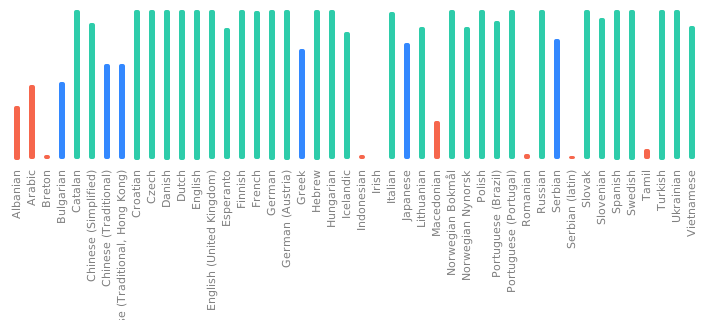
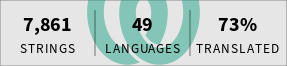
Languages
- Work in Your Native Language
- Thanks to our great international community, many contributors have helped translating Gramps into numerous languages.
- Multiple languages and cultures support is mature.
- Translations exist for 43 languages + 1 Custom Language (See the Translators Portal)
- Gramps has been designed so that new translations can easily be added with little development effort. If you are interested in participating please see the Translators Portal
- Relationship calculators available in twenty languages (See Handler List)
- Full Unicode support. Characters for all languages are properly displayed.

Third-party Addons
Gramps comes with a core set of plugins which provide all of the critical features.
However, you can extend this functionality with additional Third-party Addons. These addons provide reports, filters, views, Gramplets, and more.
Checklist
| Gramps | 5.2.x | 6.0.x | ||||||
|---|---|---|---|---|---|---|---|---|
| Price | Free | Free | ||||||
| Open Source | Yes | Yes | ||||||
| Category Views | ||||||||
| Dashboard | Yes | Yes | ||||||
| People | Yes | Yes | ||||||
| Families | Yes | Yes | ||||||
| Relationships | Yes | Yes | ||||||
| Charts | Yes (4 - Pedigree Chart / Ancestor Fan Chart / Descendant Fan / 2-Way Fan) | Yes (4 - Pedigree Chart / Ancestor Fan Chart / Descendant Fan / 2-Way Fan) | ||||||
| Events | Yes | Yes | ||||||
| Places | Yes | Yes | ||||||
| Geography | Yes | Yes | ||||||
| Sources | Yes | Yes | ||||||
| Citations | Yes | Yes | ||||||
| Repositories | Yes | Yes | ||||||
| Media | Yes | Yes | ||||||
| Notes | Yes | Yes | ||||||
| Chart Types | ||||||||
| Reports | ||||||||
| Books | Yes | Yes | ||||||
| Family Group Sheets | Yes | Yes | ||||||
| Individual Summary | Yes | Yes | ||||||
| Sosa Numbering (ascendants) | Yes | Yes | ||||||
| Henry Numbering (descendants) | Yes | Yes | ||||||
| Count numbering (descendants) | Yes | Yes | ||||||
| Calendar | Yes | Yes | ||||||
| Database | ||||||||
| Native Database | Yes (SQLite (default)/Berkeley DB (read-only)) | Yes (SQLite (default)/Berkeley DB (read-only)) | ||||||
| Size Limit | Yes (tested up to 1.4 Million people (GRANDMA)) | Yes (tested up to 1.4 Million people (GRANDMA)) | ||||||
| Open multiple Databases at once | No (works for viewing, not supported !!) | No (works for viewing, not supported !!) | ||||||
| Multimedia | ||||||||
| Audio | Yes | Yes | ||||||
| Video | Yes | Yes | ||||||
| Images | Yes | Yes | ||||||
| Remote | ||||||||
| Remote Access | Yes (linux, over X connection) | Yes (linux, over X connection) | ||||||
| Collaboration | Not in Gramps for Desktop Yes, in GrampsWeb |
Not in Gramps for Desktop Yes, in GrampsWeb | ||||||
| International | ||||||||
| Unicode | Yes(43+1) | Yes(43+1) | ||||||
| Languages | English(USA), Arabic, Bulgarian, Breton, Catalan, Czech, Danish, German, Greek, English (UK), Esperanto, Spanish, Finnish, French, Gaelic (Irish), Hebrew, Croatian, Hungarian, Icelandic, Italian, Japanese, Lithuanian, Macedonian, Norwegian (Bokmål), Dutch, Norwegian (Nynorsk), Polish, Portuguese (Brazil), Portuguese (Portugal), Romanian, Russian, Slovak, Slovenian, Albanian, Serbian, Serbian (Latin), Swedish, Tamil, Turkish, Ukrainian, Vietnamese, Chinese (Simplified), Chinese (Hong Kong), Chinese (Traditional). | English(USA), Arabic, Bulgarian, Breton, Catalan, Czech, Danish, German, Greek, English (UK), Esperanto, Spanish, Finnish, French, Gaelic (Irish), Hebrew, Croatian, Hungarian, Icelandic, Italian, Japanese, Lithuanian, Macedonian, Norwegian (Bokmål), Dutch, Norwegian (Nynorsk), Polish, Portuguese (Brazil), Portuguese (Portugal), Romanian, Russian, Slovak, Slovenian, Albanian, Serbian, Serbian (Latin), Swedish, Tamil, Turkish, Ukrainian, Vietnamese, Chinese (Simplified), Chinese (Hong Kong), Chinese (Traditional). | ||||||
| Compatibility | ||||||||
| GEDCOM 5.5 | Import/Export | Import/Export | ||||||
| GEDCOM 5.5.1 | Import/Export | Import/Export | ||||||
| GEDCOM 7.0.16 | No | No (Experimental addon for testing only available) | ||||||
| HTML | Export | Export | ||||||
| XML | Gramps XML | Gramps XML | ||||||
| Backup | On Menu | On Menu | ||||||
| Platform | ||||||||
| Linux | Yes (Officially Supported compile/install) | Yes (Officially Supported compile/install) | ||||||
| Windows | Yes (Officially Supported compile/install) | Yes (Officially Supported compile/install) | ||||||
| Mac | Yes (Community Supported) | Yes (Community Supported) | ||||||
| BSD | Yes (user compile/install) | Yes (user compile/install) | ||||||
| Additional Features | ||||||||
| Match/Merge | Yes (Limited) | Yes (Limited) | ||||||
| Multiple relationships (adoptive-foster) | Yes | Yes | ||||||
| Relationship calculator | Yes | Yes | ||||||
| Soundex calculator | Yes | Yes | ||||||
| Spell check in notes | Yes | Yes | ||||||
| 3rd party Addon/plugin infrastructure | Yes | Yes | ||||||
| Check for 3rd party Addon Updates | Yes | Yes | ||||||
| Check for Program Update | No (Available Via Addons ) | No (Available Via Addons ) | ||||||
| User Manual | Yes (online) & PDF | Yes (online) & PDF | ||||||

